What Is Gagne's Nine Events of Instruction?
Oct 05, 2026
What Is Gagne's Nine Events of Instruction?
By Dr. Robin Sargent · Founder, IDOL Academy · Last updated: June 18, 2026 · 10 min read
Quick answer
Gagne's Nine Events of Instruction is a nine-step framework for designing training that mirrors how the brain actually acquires a new skill, from grabbing attention to helping the learner apply what they learned back on the job. Instructional designers use it to plan lessons that stick.
In this article
Gagne's Nine Events of Instruction is a nine-step framework that maps a training experience to the internal cognitive stages a learner moves through when they pick up a new skill. It was developed by educational psychologist Robert M. Gagne and is one of the most widely taught models in instructional design, because it is practical, deliberately ordered, and rooted in how learning actually works.
What are Gagne's Nine Events, exactly?
Gagne built the framework on a simple idea. Learning is not one thing that happens in one moment. It is a sequence of internal events: noticing, paying attention, connecting to prior knowledge, encoding new information, practicing, getting feedback, and integrating the new skill into real work. If any of those internal events does not happen, the training does not stick. Gagne's nine events are the external instructional moves you make as a designer to trigger each of those internal events in order.
Gagne first laid out the underlying theory in his 1965 book The Conditions of Learning and refined the Nine Events in later editions. His work drew on his career studying how the U.S. military trained recruits during World War II and his later research in educational psychology. The result is a framework that has aged remarkably well, because it does not depend on a particular delivery format. It applies to an instructor-led workshop, a 10-minute eLearning module, a microlearning video, or a one-page job aid.
Most introductions to instructional design will hand you the list of nine events. Few teach you how to actually use them on a Monday. That is what we are going to walk through.
The nine events, explained simply
Here is each event in plain language, with the internal learning step it is designed to trigger and a quick example of how it shows up in a real corporate training.
1. Gain attention
Start with a hook the learner cannot ignore. A surprising stat, a short scenario, a question that names the pain. If the learner is not paying attention, nothing else matters. In an eLearning module, this is your opening screen. In a workshop, this is your first 60 seconds.
2. Inform learners of objectives
Tell them what they will be able to do by the end. Not "learn about" or "understand." Verbs that describe a real performance: identify, complete, troubleshoot, decide. This event sets the expectation and gives the learner something to measure themselves against.
3. Stimulate recall of prior learning
Connect the new content to what the learner already knows. A short reflection, a quick poll, a "you've probably already done something like this" moment. New knowledge sticks faster when it is hung on existing knowledge.
4. Present the content
This is the part most beginner designers think is the whole training. It is one of nine. Present the new information clearly, in the format that fits the content: a short video, a demo, a model, a written walk-through. Less is almost always more.
5. Provide learning guidance
Show them how to use what you just presented. Examples, analogies, worked problems, mental models. This is the bridge between "I heard it" and "I could try it."
6. Elicit performance
Have them practice. A scenario, a sandbox, a low-stakes try. Practice is where the learning actually happens. If your training has no event 6, you do not have a training. You have a presentation.
7. Provide feedback
Tell them how the practice went. Specific, immediate, useful. "Correct" is the bare minimum. "Correct, because you spotted the missing field before the form was submitted" is the goal.
8. Assess performance
A formal check that the learning landed. A quiz, a simulation, a checklist, a manager observation. The assessment should look like the real work as closely as possible.
9. Enhance retention and transfer
Help them carry the skill back to the job. A job aid, a follow-up email, a spaced practice prompt, a manager conversation guide. Transfer is the only event that matters to the business. The rest is preparation for it.
Want to see if instructional design is the right move for you?
IDOL Academy is a GNPEC-authorized 24-week program that combines 16 Credly-verified credentials, built-in AI training, and a real internship milestone, all at a price point below comparable bootcamps.
Try IDOL Academy FreeWhy instructional designers still use Gagne
Frameworks come and go in this field. Gagne's Nine Events have stuck around for sixty years for three reasons.
- It maps to cognition, not to a delivery format. The events describe what is happening inside the learner. That makes the framework portable across instructor-led training, eLearning, video, microlearning, and AI-assisted learning experiences.
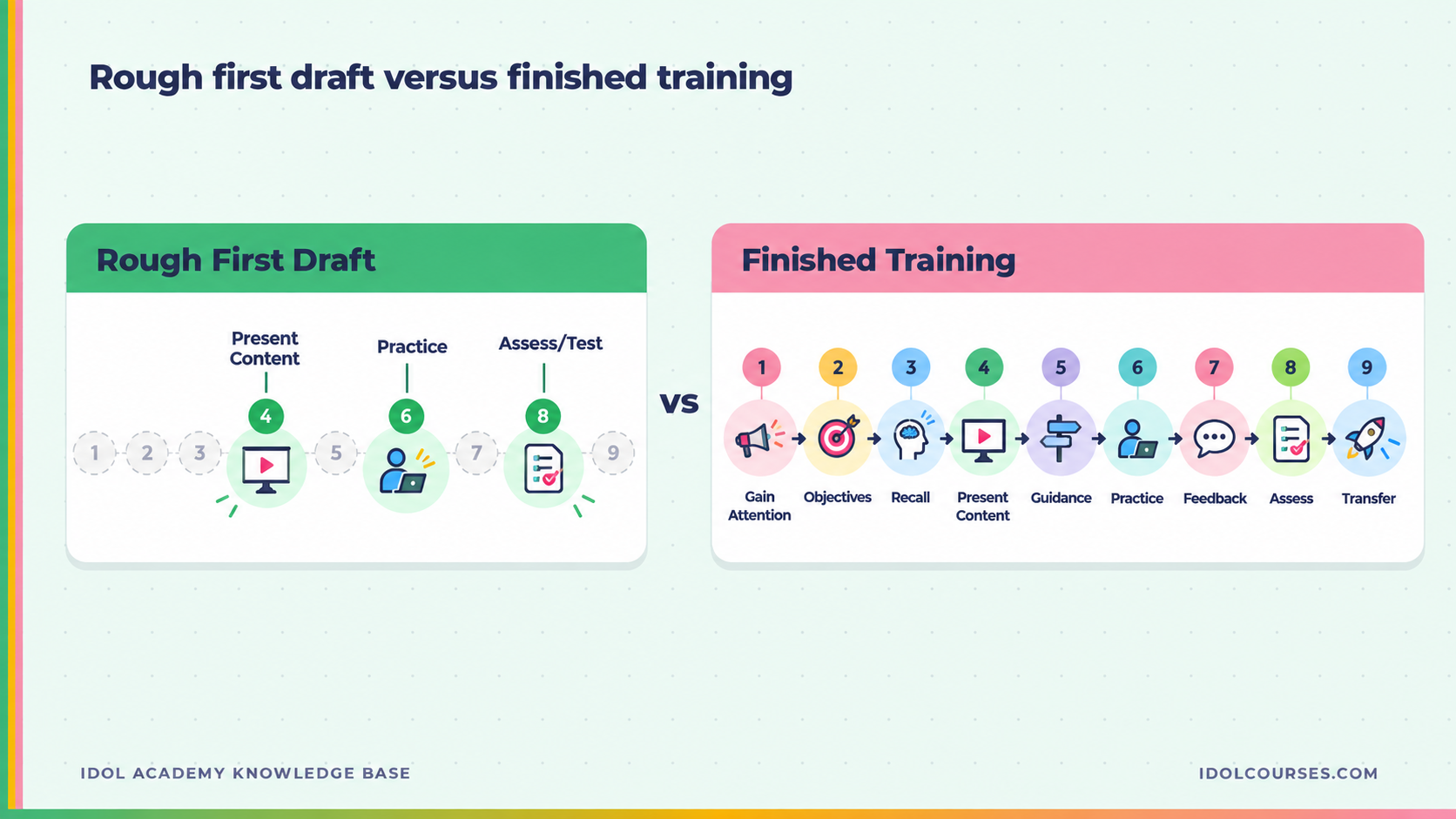
- It catches the events beginner designers skip. Most rough first drafts of a training contain events 4, 6, and 8 (present, practice, test). Gagne reminds you that you also need events 1, 2, 3, 5, 7, and 9. That is where the difference between forgettable and effective lives.
- It gives you shared language with your stakeholders. Saying "we have presentation but no guidance and no practice" lands with a subject matter expert faster than "this needs more interactivity." Vocabulary is leverage.
How to apply the nine events without checklist-itis
Here is where most new designers go sideways with Gagne. They turn it into a checklist that produces a nine-slide deck where slide one says "Attention" and slide two says "Objectives." That is not the point. The point is to make sure each cognitive step has a deliberate plan, even if several events get collapsed into the same screen, scene, or activity.
A practical way to use the framework on a real project:
- Write your learning objectives first. (That is event 2 doing double duty as your design anchor.)
- For each objective, sketch the nine events as a single row. What is the hook? What prior knowledge are you activating? What are you presenting? How will they practice? How will you give feedback? How will you assess? How will they take it back to work?
- Look at the row. If any column is empty, ask whether that event genuinely is not needed for this objective, or whether you skipped it because it was hard. Most of the time, you skipped it because it was hard.
- Collapse where it makes sense. A short microlearning video can hold events 1, 2, and 3 in the first 20 seconds. A scenario can hold events 4, 5, 6, and 7 in a single interaction. The framework is for analysis, not for production.
"The framework is for analysis, not for production. Use it to find the gaps in your design, not to dictate your slide count." — Dr. Robin Sargent
Inside IDOL Academy, you use frameworks like Gagne on real projects, not on hypothetical worksheets. Your milestone work goes through a real rubric and gets reviewed and graded by me. That is the part that turns a framework on a page into a skill you can use on Monday.
Gagne vs ADDIE, Bloom's, and Merrill's First Principles
A common point of confusion: how does Gagne fit with the other instructional design frameworks you keep hearing about? Short answer: they sit at different levels of the same stack.
| Framework | What it covers | When you use it |
|---|---|---|
| ADDIE | The process of building a training program: Analyze, Design, Develop, Implement, Evaluate. | As the overall lifecycle of a project. Gagne lives inside the Design phase. |
| Bloom's Taxonomy | A classification of the type of thinking a learner does, from Remember to Create. | When you write learning objectives, to make sure you are aiming for the right depth of thinking. |
| Gagne's Nine Events | The sequence of instructional moves that mirrors how a learner acquires a new skill. | When you design the actual experience for each objective. |
| Merrill's First Principles | Five principles for effective instruction: activation, demonstration, application, task-centered, integration. | As a higher-level lens on whether your design is anchored to a real problem and a real task. |
| Kirkpatrick Model | A four-level framework for evaluating training: Reaction, Learning, Behavior, Results. | In the Evaluate phase of ADDIE, to measure whether the training actually worked. |
In a real project, you might use ADDIE to manage the lifecycle, Bloom's to write objectives, Gagne to design the experience, Merrill to sanity-check your anchoring, and Kirkpatrick to plan how you will know it worked. Each one earns its keep by answering a different question.
If you want a refresher on the other frameworks in this stack, see What Is the ADDIE Model? and What Is Bloom's Taxonomy?
Common mistakes to avoid
After 12+ years of building training and a few thousand learner portfolios reviewed, here are the four ways I most often see Gagne go wrong.
- Treating it as a slide structure. Nine events does not mean nine slides. It means nine cognitive moves, often collapsed.
- Skipping event 9 entirely. Retention and transfer is the only event the business cares about. Most trainings stop at event 8, and the skill evaporates within two weeks. Build the job aid. Send the follow-up. Schedule the manager check-in.
- Making "gain attention" a gimmick. A surprising stock photo is not attention. A real, named problem the learner has actually faced is attention.
- Confusing "elicit performance" with "click next." Practice means the learner does something that looks like the real work. Clicking a button to advance is not practice.
For external context, the U.S. Bureau of Labor Statistics tracks training and development specialist roles, which include instructional designers, in their Occupational Outlook Handbook. Most of those roles list cognitive learning frameworks like Gagne's in the qualifications, even when they do not name them directly.
Frequently asked questions
What are the nine events of instruction?
The nine events are: gain attention, inform learners of objectives, stimulate recall of prior learning, present the content, provide learning guidance, elicit performance, provide feedback, assess performance, and enhance retention and transfer. They map to the internal stages a learner moves through when acquiring a new skill.
Who created Gagne's Nine Events of Instruction?
American educational psychologist Robert M. Gagne created the framework. He introduced the underlying theory in his 1965 book The Conditions of Learning and refined the Nine Events of Instruction in later editions. He spent his career studying how people actually acquire skills, including work for the U.S. military during World War II.
Are Gagne's Nine Events still relevant today?
Yes. Gagne's Nine Events remain one of the most widely used instructional design frameworks in corporate training, higher education, and eLearning. They are still relevant because they are built on cognitive learning theory, not on any particular delivery format, so the events apply to in-person workshops, eLearning modules, video, and microlearning alike.
Do you have to use all nine events in every training?
No. Treat the nine events as a checklist for analysis, not a recipe you follow in order. Most short trainings collapse events together or skip ones that are not needed. The point is to make sure you have a deliberate plan for each cognitive step a learner will need, not to produce a nine-slide deck.
How is Gagne different from Bloom's Taxonomy?
Bloom's Taxonomy classifies the type of thinking you want a learner to do, from remembering to creating. Gagne's Nine Events describes the sequence of events that help any of that thinking actually happen. You use Bloom's to decide what kind of learning outcome you are after, then use Gagne to design the experience that gets the learner there.
How do Gagne's Nine Events fit with ADDIE?
ADDIE is the process you use to build training: Analyze, Design, Develop, Implement, and Evaluate. Gagne's Nine Events live inside the Design phase. ADDIE tells you the order of your project. Gagne tells you the order of the learner's experience.
Gagne's Nine Events is one of the most useful frameworks in instructional design because it forces you to plan for every cognitive step a learner will take, not just the ones that are easy to build. If you want to put it to work on a real project this week, the IDOL Academy free trial is a low-risk place to start.
Want to see if instructional design is the right move for you?
IDOL Academy is a GNPEC-authorized 24-week program that combines 16 Credly-verified credentials, built-in AI training, and a real internship milestone, all at a price point below comparable bootcamps.
Try IDOL Academy Free